Keyword Cannibalization: How to Find, Fix & Prevent It
Keyword cannibalization happens when multiple pages on your site compete for the same search intent. This guide shows how to detect competing URLs in Google Search Console, decide whether to merge, redirect, canonicalize, or differentiate pages, and prevent the issue with intent-based keyword clustering.
Want to analyze your own GSC data instead of reading the method?
Open the keyword cannibalization checkerQuick answer — what it is: Keyword cannibalization is when two or more pages on the same domain target identical or highly similar queries, causing search engines to split relevance signals and lowering each page's ranking potential.
How to fix it: Identify competing URLs in Google Search Console, choose the strongest page by intent and traffic, then consolidate, redirect, canonicalize, or differentiate the weaker pages. Expect ranking changes within 2–6 weeks.
Automated Keyword Cannibalization Checker: What It Should Show
A useful keyword cannibalization checker should do more than list URLs that mention the same keyword. It should use real performance data to show whether those URLs actually compete in search.
Manual GSC check
- Check one query at a time
- Review ranking URLs manually
- Estimate whether clicks are split
- Decide fixes in a spreadsheet
SEOcluster.ai check
- Clusters related queries by intent
- Maps each cluster to competing URLs
- Shows click-share and severity
- Turns strong signals into review-ready SEO Actions
Most sites with 50+ pages have at least 3–5 cannibalization issues hiding in their GSC data.
What Is Keyword Cannibalization?
Keyword cannibalization occurs when two or more pages on your site target the same (or very similar) search query. Instead of one strong page ranking well, Google has to choose between them — and often gets it wrong.
Consider this example: a plumbing company has both https://example.com/services/plumbing and https://example.com/blog/plumbing-tips competing for "plumber near me." Google sees two relevant pages and splits the ranking signals between them. This is especially damaging when the queries share the same semantic meaning — even if the wording differs.
The result: neither page ranks as well as one consolidated, authoritative page would.
Why It Matters More Than You Think
Cannibalization doesn't just cost you a few positions. It creates a cascade of SEO problems:
Impressions get divided across multiple URLs, so neither page accumulates enough CTR to signal strong relevance.
Google spends resources crawling and indexing pages that compete with each other instead of discovering new content.
External links pointing to both pages split the authority that could strengthen one definitive page.
Google can't determine which page is the authoritative source, so it may rank neither prominently — or flip between them unpredictably.
Common Cannibalization Scenarios
Cannibalization takes many forms. Here are the most common patterns to watch for:
Blog post vs. service page
A blog post titled "Everything About Kitchen Renovation" competes with your service page at https://example.com/services/kitchen-renovation for the same queries. The blog post is informational; the service page is transactional. Google may surface the wrong one.
Fix: Differentiate intent. Rewrite the blog to target informational queries ("kitchen renovation ideas") and the service page to target commercial/local queries ("kitchen renovation service [city]").
Multiple location pages with identical content
Pages like https://example.com/plumber-sydney and https://example.com/plumber-eastern-suburbs target overlapping queries when the content is near-identical. Google sees both as thin variations of the same page.
Fix: Make each page genuinely unique with location-specific content, testimonials, and service details. Or consolidate into one broader page if the areas overlap.
Old content competing with new content
You publish a new, comprehensive guide on a topic but forget about the old blog post covering the same subject. Both pages rank, splitting signals. This is especially common on sites with years of accumulated content.
Fix: 301 redirect the old post to the new one. If the old post has valuable backlinks, merge the best content before redirecting.
Category page vs. product page
An e-commerce category page for "running shoes" competes with individual product pages that also target "running shoes" in their titles and descriptions.
Fix: Use canonical tags to point product pages to the category for broad terms, while letting product pages rank for specific model queries.
How to Detect Cannibalization
There are several ways to find cannibalization issues, ranging from free manual methods to automated detection.
Method 1: Google Search Console (Free)
This is the most reliable free method:
- 1.Go to Performance in GSC
- 2.Filter by a specific query you want to check
- 3.Click the Pages tab to see which URLs appear
- 4.If 2+ URLs appear for the same query, you have cannibalization
Limitation: This is manual and works one query at a time. For sites with thousands of queries, it's not practical to check each one individually. See our guide on clustering keywords from GSC for a more scalable approach.
Method 2: Site Search Operator (Free)
Search Google with the operator:
If multiple pages appear in the results, those pages may be competing. This method is quick but surface-level — it shows what Google has indexed for the term, but doesn't tell you about click distribution or ranking positions.
Method 3: Automated Keyword Cannibalization Tool with SEOcluster.ai
Instead of checking queries one at a time, SEOcluster.ai acts as an automated keyword cannibalization checker for your entire GSC dataset:
- Clusters keywords by semantic meaning, then maps each cluster to existing URLs on your site
- HHI (Herfindahl-Hirschman Index) scoring measures how concentrated or split your clicks are across competing URLs
- Flags exact conflicts: which URLs compete, for which queries, and how severely
- Severity levels (High / Medium / Low) based on click-share analysis help you prioritize fixes
This approach scales to thousands of queries and surfaces issues you'd never find manually. See how semantic keyword clustering and grouping works under the hood.
Download sample split rankings CSV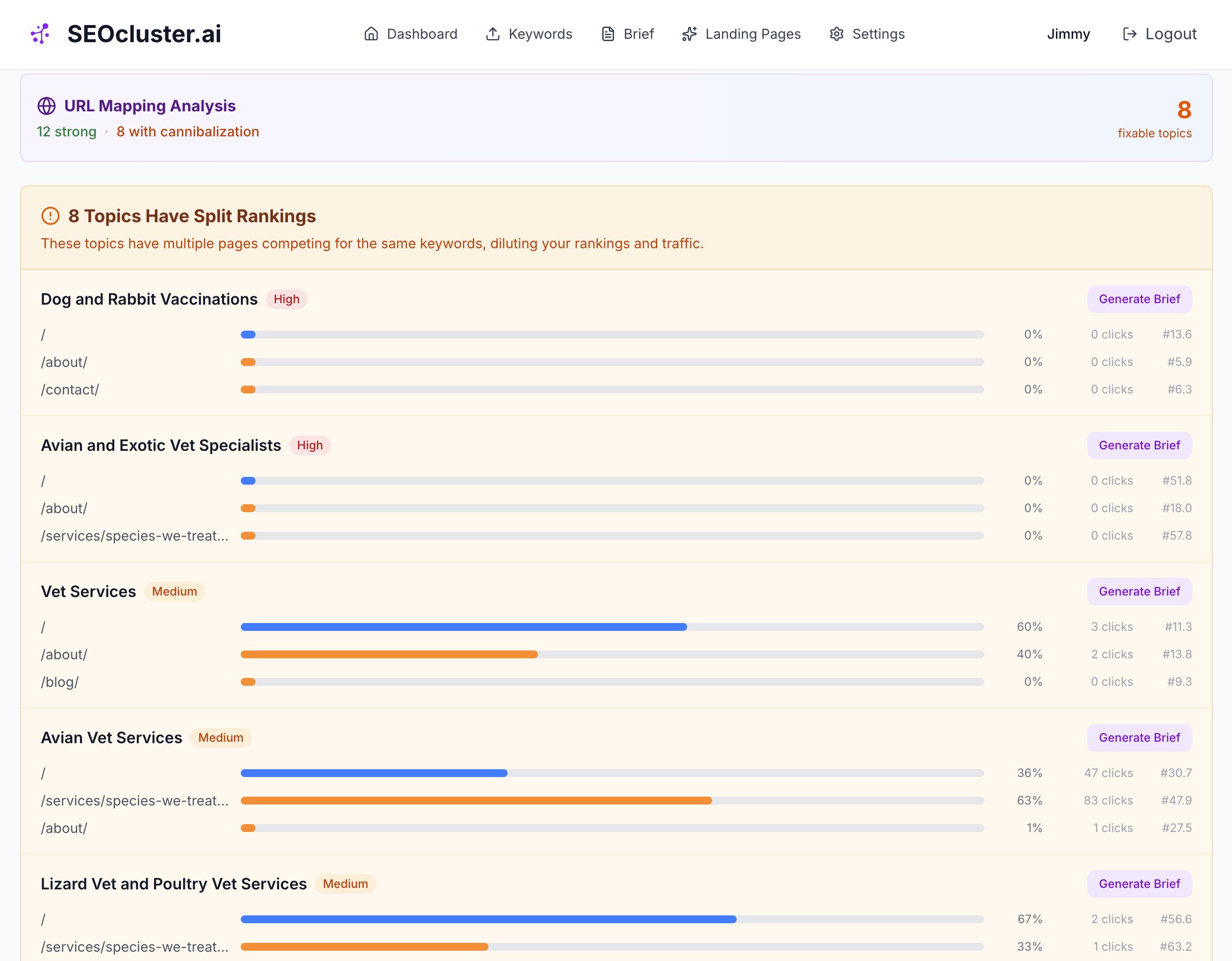
SEOcluster.ai's split-ranking report: competing URLs, click-share distribution, severity, clicks, and position data. Client URLs are hidden for privacy.
How to Fix Cannibalization
Once you've identified competing pages, choose the right fix based on the situation. Here are four proven approaches:
Option 1: Consolidate Content (Most Common)
This is the most effective fix for most cannibalization issues:
- Identify the stronger page (more backlinks, higher average position, more clicks)
- Merge the best content from the weaker page into the stronger one
- Set up a 301 redirect from the old URL to the consolidated page
The combined page inherits authority from both URLs and typically ranks higher than either page did individually.
Option 2: Differentiate Intent
If the two pages genuinely serve different user intents, the fix is to make each page's focus unmistakably clear:
- Update titles and H1s to reflect distinct purposes (e.g., "Plumbing Services in Chicago" vs. "DIY Plumbing Tips for Homeowners")
- Rewrite content to target clearly different queries and search intents
- Use internal links to cross-reference between the two pages, signaling their relationship to Google
This works well when one page is transactional (service/product) and the other is informational (blog/guide). Learn more about intent types in our intent-based keyword clustering guide.
Option 3: Canonical Tags
When you need both pages to exist (e.g., a product page and a category page), use canonical tags to tell Google which is the primary version:
- Add a
rel="canonical"tag on the weaker page pointing to the stronger page - This consolidates ranking signals without removing either page from the site
Note: Google treats canonical tags as a hint, not a directive. If the pages are very different, Google may ignore the canonical.
Option 4: Internal Linking
Use your internal link structure to signal which page is the primary authority for a topic:
- Increase internal links pointing to the primary page using relevant anchor text
- Remove or reduce internal links pointing to the secondary page for that topic
- Add a link from the secondary page to the primary page to reinforce the hierarchy
Internal linking alone won't fix severe cannibalization, but it's a good supporting strategy alongside other fixes.
Prevention: Stop Cannibalization Before It Starts
The best fix is preventing cannibalization from happening in the first place. Three practices make the biggest difference:
- 1.Cluster keywords before creating content
Group related queries by intent and assign one target page per cluster. This ensures you never create two pages targeting the same query. See how to cluster keywords from GSC for a step-by-step walkthrough.
- 2.One target page per topic cluster
Every keyword cluster should map to exactly one primary URL. Supporting pages can link to it, but should not compete with it. This is how topical authority is built — not by publishing more pages, but by consolidating authority into fewer, stronger ones.
- 3.Regular audits with GSC or automated tools
Check monthly for new cannibalization issues, especially after publishing batches of new content. Automated tools can flag conflicts as they emerge, before they impact rankings.
How to Prioritize Which Issues to Fix First
Not all cannibalization is equally damaging. Focus your efforts where the impact will be greatest:
| Priority | Signal | Why it matters |
|---|---|---|
| High | Clicks split 40/60 or worse between two URLs | Neither page accumulates enough CTR to rank well |
| High | High-volume query with multiple ranking URLs | More traffic at stake = bigger potential gain from fixing |
| Medium | Google flips between pages (ranking fluctuations) | Inconsistent rankings hurt long-term CTR and trust |
| Medium | Position 4–15 queries with split URLs | Close to page 1 — consolidating could push you into top positions |
| Low | One page gets 90%+ of clicks | The dominant page is already winning; fix when you have time |
As a rule of thumb: start with your highest-volume queries where clicks are most evenly split between competing pages. These represent your biggest untapped ranking gains.
Frequently Asked Questions
How do I know if I have keyword cannibalization?
Check Google Search Console Performance: filter by query, then look at the Pages tab. If multiple URLs appear for the same keyword, those pages are competing against each other.
Does keyword cannibalization always hurt rankings?
Not always, but usually. If one page has 90% of clicks and the other has 10%, the impact is minor. If clicks are split 50/50, both pages suffer significantly.
Should I delete the weaker page?
Not necessarily. Often consolidating content (merging the best parts of both pages) and redirecting performs better than deletion. The combined page inherits authority from both URLs.
How often should I check for cannibalization?
Monthly for active sites. After any major content push (10+ new pages), check immediately. Automated tools like SEOcluster.ai flag issues in real-time during clustering.
Can keyword cannibalization affect e-commerce sites?
Yes, and it's very common. Category pages, product pages, and brand pages often compete for the same queries. Use canonical tags and clear internal linking hierarchies to signal which page should rank for broad terms vs. specific product queries.
What is the difference between keyword cannibalization and duplicate content?
Duplicate content means two pages have nearly identical text. Keyword cannibalization means two pages target the same search query, even if their content is different. A service page and a blog post can cannibalize each other without sharing any duplicate text.
Does keyword clustering prevent cannibalization?
Yes. Keyword clustering groups related queries together and assigns one target page per cluster. This ensures you don't accidentally create two pages targeting the same intent. It's the most effective prevention strategy.
How long does it take for Google to react after fixing cannibalization?
Typically 2–6 weeks for 301 redirects and content consolidation. Canonical tag changes may take longer since Google treats them as hints. You can speed up the process by requesting re-indexing in Google Search Console.
Can cannibalization happen with pages on different subdomains?
Yes. Google treats subdomains as separate properties, but pages on blog.example.com and www.example.com can still compete for the same queries. This is actually harder to detect because GSC treats each subdomain as a separate property.
What tools can detect keyword cannibalization automatically?
SEOcluster.ai detects cannibalization automatically during keyword clustering by mapping clusters to existing URLs and using HHI scoring to measure click distribution. Ahrefs and Semrush can help identify it through their keyword tracking features, though they require more manual analysis. See our tools comparison for details.
Run an automated cannibalization check from your GSC data
SEOcluster.ai detects cannibalization automatically when you cluster your GSC data — no manual query-by-query checking required. The cannibalization report shows exactly which pages compete, with severity scores and review recommendations.
Continue Reading
- Case Study: From 2,000 GSC Queries to 18 Pages →
- How to Cluster Keywords Using Google Search Console →
- Topical Authority Explained: How Google Evaluates Content Depth →
- Intent-Based Keyword Clustering: Methods, Trade-offs, and Pitfalls →
- Best Keyword Clustering Tools 2026 →
- Semantic Keyword Clustering vs Traditional Methods →